Castria is a podcast app that automatically detects and skips ads — no manual scrubbing, no sitting through the same 90-second read every episode. It runs today on iOS, Android, and the web from one shared codebase. Getting there took two rewrites. The second one, forced by Android, taught me more about mobile architecture than the first.
Starting simple
I wasn't sure Castria would work at all, so I started with the simplest thing that could prove it out: a web page backed by a server that did all the heavy lifting. My wife and I used it daily, and every obstacle I expected to block the idea turned out not to.
The next step was a PWA — a web app installable from the browser, unlocking local downloads, background behavior, and notifications without an app store. It worked, but almost nobody installed it. People don't install web apps, even good ones. If I wanted real adoption, I needed to be in the app stores.
The iOS model: JS with native holes
I started with iOS, since that's the daily driver for my wife and me. My mental model was: write the application logic and UI in web land (HTML + JavaScript), and drop in native code only where the web can't reach — background audio playback, for example. This maps almost directly onto how iOS hybrid apps work, via Capacitor. It worked beautifully. I got a fully native app in the App Store while keeping the thing I cared most about: shipping UI changes instantly, with no app-store review in the loop.
Once it was solid enough for early feedback from friends and test users, I shipped it and turned to Android.
This will be easy, I thought. Reuse 100% of the web code, write Android-native versions of the same few services iOS needed, done in a couple of weeks.
I was wrong.
What broke
The app worked fine while I was actively testing it. Installed on a real device and used the way a real listener uses a podcast app — phone locked, app backgrounded, hours between opens — it failed in ways that looked random.
The symptoms all had the same shape: something the app was supposed to have already handled just wasn't ready.
- Ad-skip wouldn't fire. It wasn't a detection problem — the app already had everything it needed to make the call. It just wouldn't act on it unless I was staring at the screen. Phone in my pocket, just listening? No skip.
- Fix that, and autoplay broke next — the following episode hadn't finished downloading or processing, even though that was supposed to happen quietly in the background.
- Playback would stop mid-episode for no clear reason. For a while I blamed my phone getting bumped in my pocket — a "butt pause."
- It stopped every time I locked the phone, too.
Underneath all of it was the same root pattern: background work that was supposed to happen automatically kept not happening. Episodes ended up downloading and processing on demand, right when I hit play, instead of ahead of time.
The wrong diagnosis
My first theory was lifecycle race conditions: Android fires different lifecycle events than iOS, and I assumed the native start/stop/resume guards I'd written were losing races against them. That theory was partly true, but it was a red herring — fixing it didn't fix the bugs.
The real cause: Android kills WebViews
The actual problem was architectural, not a timing bug. iOS keeps a hybrid app's WebView alive alongside its native code, so application logic sitting in JavaScript can keep running, or resume cleanly, even when the app isn't in the foreground. Android makes no such promise — it kills WebViews aggressively to reclaim memory, and with it, whatever state and logic were living in JavaScript.
So any application logic I'd written in JS — the part I thought I could reuse 100% — was exactly the part Android couldn't be trusted to keep running. Everything that looked like a random, hard-to-reproduce bug traced back to this one fact: the WebView, and the JavaScript logic inside it, wasn't there anymore when the app needed it.
The fix: Ports and Adapters
Fixing the Android-specific bugs wasn't enough — the real fix was ground-up architecture on all three platforms, because they now needed to agree on one rule for what could live where.
That rule became: JavaScript is a dumb wrapper. Anything that has to survive the app's process dying — playback position, downloaded files, the ad-detection pipeline, the queue of what plays next, auth tokens — moved into native code that owns that state completely. JS doesn't hold a copy of it; it sends commands, listens for events, and re-asks for the current state whenever the app comes back to life. Everything else — UI, screens, user-facing logic — still lives in one shared TypeScript codebase across all three platforms.
Each of those native-owned pieces follows the same shape: a platform-agnostic interface (the port) that defines what the service does, and a platform-specific implementation (the adapter) — Kotlin on Android, Swift on iOS, JavaScript/IndexedDB on the web — that does it. The interface is the contract; the UI only ever talks to the contract, never to a specific platform's implementation.
This meant rewriting iOS and web too, even though neither was broken. It was the only way to have one execution model instead of two, so a whole class of subtle cross-platform bugs couldn't exist in the first place.
What this means today
All three platforms now play by the same rule, just in different languages: Kotlin for Android, Swift for iOS, TypeScript for the web. The tradeoff is that I test and verify each platform independently before every release — there's no longer a single "the web code, times three" surface to check. But the class of bug that sent me back to the drawing board on Android — logic that quietly stops running because the thing hosting it went away — is gone on all three.
If you're building a hybrid app and it "just works" on iOS, don't assume Android will be a native port of the same services. Ask what your architecture assumes about the WebView always being there — because if that assumption breaks on Android, Android is the platform that wins the argument.
Call it the California effect. California doesn't set federal car standards, but it's big enough that manufacturers build to its stricter rules everywhere, rather than run two production lines. Android does the same thing to hybrid apps: you can run an Android-shaped architecture cleanly on iOS and the web, but not the other way around. So the strictest platform ends up setting the standard — not because you love its rules, but because building to anything looser just means shipping two different apps.
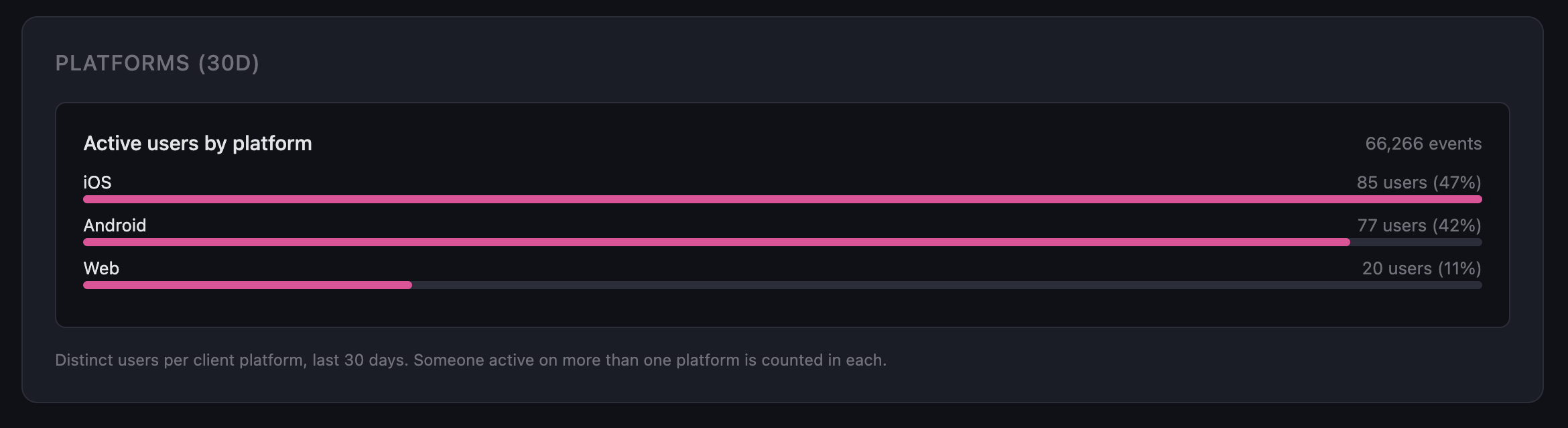
Android isn't a rounding error here. It's 42% of active users, right behind iOS.